A T T E N O V A
30
s
Typical Check-in Time
7
Days Saved Offline
5
Role-Based Portals
0
₦
Cost to Universities
WHY ATTENOVA

Built for modern campuses

A complete attendance solution designed around how universities actually operate — no hardware, no hassle, zero cost to deploy.

Shape
GPS Verified

GPS & Face Verified Attendance

Students can only mark attendance when they are physically inside the classroom radius and pass a live face check. The location is verified again on our server using the Haversine formula — no faking it.

Easy to Use

Mark in Under 30 Seconds

Students get a reminder before class, open Attenova and pick the class. Once their location is verified, the access code fills in for them, and a quick face check finishes it — about 30 seconds in all.

Real-time Reports

Instant Reports & Analytics

Lecturers see who's present in real time, and how each mark was made. Reports per course and per student download to Excel or PDF at any time, and students at risk are flagged automatically.

GPS + FACE VERIFICATION

How Attenova stops proxy attendance

A friend can’t mark for you, and you can’t mark from your hostel. Every check-in has to pass several independent checks at once — and every mark is recorded with its time, location and GPS accuracy, so lecturers can see exactly how it was made.

Code GPS Face Marked

GPS geofence

The student’s location is checked on our server against the classroom’s position. Outside the radius the lecturer set, the check-in is rejected.

Face verification

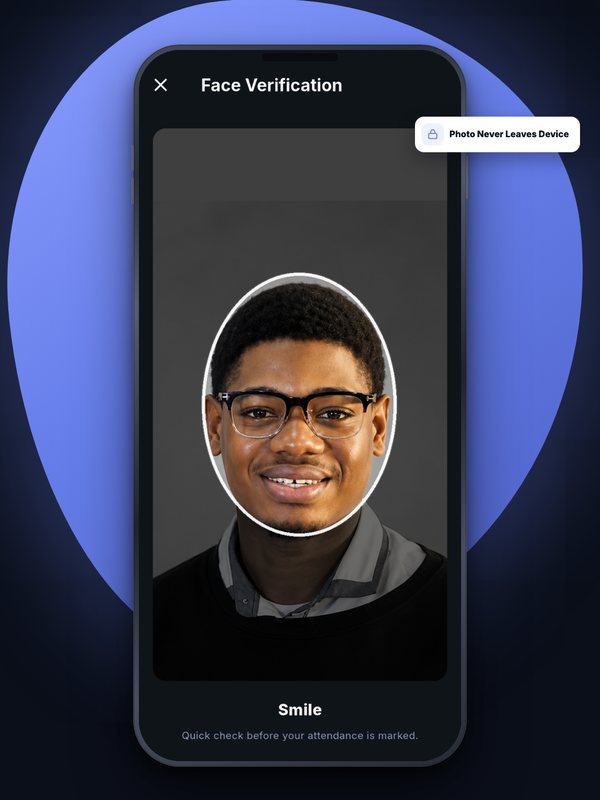
The student’s face is matched against the face they enrolled — on the phone itself, so their photo never has to leave the device.

Liveness check

A quick random action — blink, smile or turn your head — so a printed photo or a recorded video can’t pass as the student.

Fake-GPS detection

Location-spoofing apps are detected and the check-in is refused.

Codes that expire

Each class has its own code or QR code, accepted only while the attendance window is open — sharing it after class does nothing.

Left-early detection

A student who marks and then walks out of the classroom area is flagged to the lecturer.

EVERYTHING IN ONE APP

More than class attendance

The tools universities asked for, built into the same app students and staff already use.

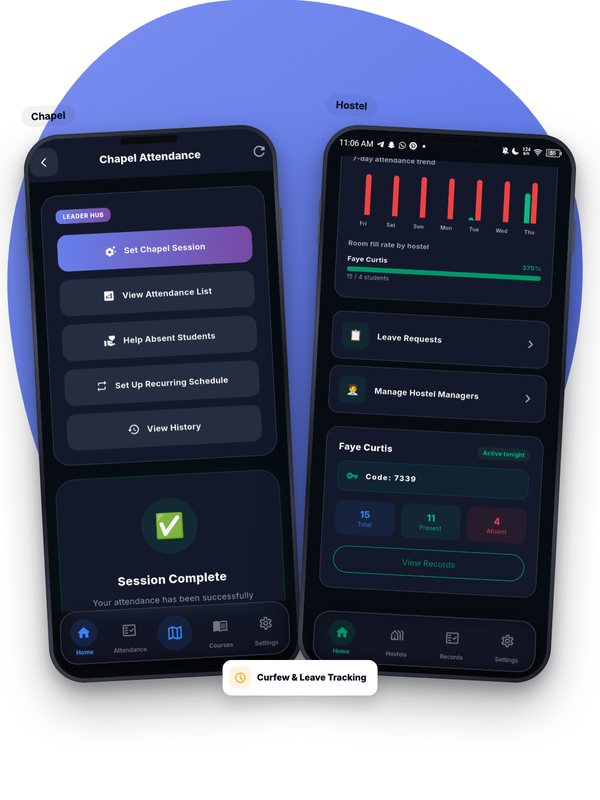
Hostel bed-check & devotion

Nightly bed-check plus morning and night devotion attendance. Create every room in a hostel at once, and set one curfew for all hostels.

Rotating class QR

A QR code that changes every 15 seconds, shown on the lecturer’s or course rep’s phone. It backs up the face check — and proves a student is in the room when indoor GPS is wrong.

Course reps

Lecturers choose trusted students per course. A rep can update the venue when class moves rooms, show the class QR, and ask the lecturer to mark a classmate who couldn’t check in.

Class moved rooms?

One tap sets the class to the lecturer’s current location. Students who were turned away as “too far” are told to mark again — no one is wrongly marked absent.

Works with no network

Open Attenova once with data and the next 7 days of classes, chapel and hostel times are saved. Mark with no data — in the app or the website — and it sends itself when the network returns, counted at the time you tapped.

Locked to you

Attenova locks itself after 15 minutes without use. Unlock with your fingerprint or face, or on the website with Face ID or a 4-digit PIN — even with no data.

Download any report

Every attendance list and history downloads as an Excel sheet or a ready-to-print PDF, and management gets a summary by email every week.

Absence alerts

When a student misses three classes or bed-checks in a row without an excuse, the student and their lecturer or hostel manager are alerted.

Leave & excuse requests

Students request leave in the app with their proof. Each request goes to the right person — lecturer, hostel manager, DSA, Chaplain or Exam Officer — and approved leave counts as excused, never absent.

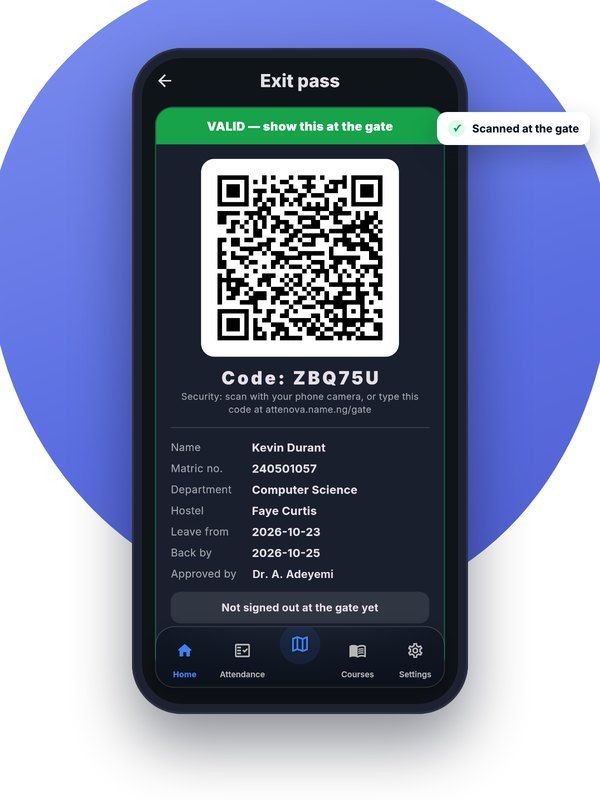
Exit passes at the gate

Approved off-campus leave gives the student a QR exit pass. Security scans it to sign them out and back in, and the DSA sees who is away and who is overdue.

Staff roles

HODs, Deans, the DSA, the Chaplain and the Exam Officer each get a portal for exactly their area — and nothing else.

Breaks & holidays

Breaks, public holidays and department weeks pause the right attendance automatically. Students going home tap “I’m going home” and are excused for the break.

Camera not working?

A student whose camera can’t do the face check can ask for another way to mark — their phone’s own lock, or location only — approved by the school.

Secure admin sign-in

Administrator accounts are protected by a one-time code sent by email, so a stolen password alone can’t open them.

Left-early detection

Checking in and walking out doesn’t work: a student who leaves the classroom area after marking is flagged to the lecturer.

Exam attendance

Invigilators check students in with their exam pass and a live face match, so no one can sit an exam for someone else.

Campus events

Seminars, conferences and other events get their own check-in with an access code and, where needed, GPS.

Attendance appeals

A student whose check-in failed can appeal with the reason; the lecturer sees the GPS evidence and approves or rejects in the app.

Works on any phone

Android app on Google Play. On iPhone, use the Attenova website and add it to the Home Screen — it works like an app. The App Store app is coming soon.

ClassPulse quizzes

Live class quizzes, polls and anonymous Q&A, with AI that writes questions from a lecturer’s notes. Switched on per university.

CLASSPULSE · LIVE CLASS QUIZZES

Know who’s lost in class — before the exam does

ClassPulse turns any lecture into a two-way class. Lecturers run quick quizzes, polls and anonymous Q&A from the same Attenova app — AI can write the questions from a topic, their notes or a photo — and see straight away which students and which topics need more help.

Questions Live or homework Students answer Report
ClassPulse on two phones: the lecturer's live results with an “I'm lost” alert, and a student answering a maths question

For lecturers

  • AI writes questions from a topic, your PDF, Word or text notes, or a photo of a page — or type your own, maths included.
  • Review every question before students see it.
  • Run it live in class or as homework with a due date.
  • A report after each session: who needs help and which topics to re-teach.

For students

  • A notification when a quiz starts — one tap to join, no codes.
  • The right answer and a short explanation after each question.
  • Tap “I’m lost” or ask a question anonymously at any time.
  • Your score, the class leaderboard and your results history.

For the university

  • No extra fee for students or the university.
  • Switched on per university, whenever you’re ready.
  • Admins see results across courses; HODs and deans see their departments.
  • Only enrolled, activated students can join.

Works in the Attenova Android app and on the website on any phone, including iPhone. Questions about ClassPulse?

SEE IT IN ACTION

A look inside the app

From a student’s 30-second check-in to the admin’s school-wide view.

Student dashboard: classes, chapel, attendance and more in one place
Marking attendance with GPS verification
On-device face verification
Attendance report for a course
Offline mode: marks sync when the network returns
Lecturer portal: classes and recurring schedules
Admin dashboard: school-wide insight
Chapel and hostel attendance
UNIVERSITIES ONBOARDING WITH ATTENOVA

Want Attenova at your university? Talk to us — setup costs your institution nothing.

Attenova Dashboard

Zero cost for universities.
Nothing to buy or install.

Attenova requires no upfront investment from the institution. Students pay an activation fee each semester — ₦5,000 as standard — while we handle hosting, support and updates.

  • ₦0 setup, hosting, or maintenance cost
  • No hardware: it runs on the phones people already have
  • Full training for lecturers, students & admins
  • Nightly encrypted backups and ongoing updates
GETTING STARTED

From first conversation to live attendance

Three simple steps — with our support at every one, and no cost to the university.

The university joins

We set up the university, its departments and administrators, who approve which staff emails can sign up — at no cost to the university.

Lecturers set up their classes

Lecturers create their courses and classes — one-off or weekly — and set where each class takes place. Our team helps anyone who needs it.

Students join and check in

Students get the app from Google Play (or use the website on iPhone), set up their face once and add their courses — then check in to every class in about 30 seconds.

Everything you need to eliminate proxy attendance

Attenova combines GPS location verification, face verification, class access codes and a rotating class QR with real-time dashboards, to give lecturers complete visibility over who is actually in class — not just who claims to be.

Built for Scale & Reliability

  • Built for weak campus networks: marks are saved on the phone and sent by themselves, and a mark can never be counted twice.
  • All data is encrypted in transit, passwords are bcrypt-hashed, and the database is backed up every night, encrypted. Chapel, hostel bed-checks and devotion, leave requests and weekly timetables are all built in.
Attenova Live Dashboard
Live Dashboard
See who's present in real time as students mark attendance
  • Student
  • Student
  • Student
  • Student

Attendance updates instantly as students check in

Get Started
SIMPLE PRICING

One transparent fee.
No hidden charges.

Students pay ₦5,000 per semester as standard, and each university can agree a different fee. Universities pay nothing — ever.

Student Activation

One activation fee per student, per semester. Full access to every feature the university uses.

₦5,000 / semester

Our standard fee — a university can agree a higher or lower fee.

  • GPS-verified attendance marking
  • Facial verification
  • Real-time class notifications
  • Personal attendance history & stats
  • Android app on Google Play + website for iPhone (App Store app coming soon)
  • Low attendance warnings
  • Works with no network, and locks to you
  • ClassPulse quizzes (when your university turns it on)
Learn More

University Partnership

Full institutional deployment at absolutely zero cost to the university.

₦0 / always

  • Full system setup & configuration
  • Lecturer & admin training included
  • Staff portals for HODs, Deans, DSA, Chaplain & Exam Officer
  • School-wide analytics dashboard
  • Ongoing support & system updates
Partner With Us
INSIGHTS & UPDATES

Latest from the Attenova blog

Leaving campus the right way: leave requests and exit passes

From asking for leave to walking back through the gate: how Attenova routes every request to the right person, excuses …

Continue Reading

How an Attenova check-in works, step by step

A student taps “Mark attendance” and about 30 seconds later they’re marked present. Here is everything that happens in …

Continue Reading

Running hostel bed-checks without a clipboard

Nightly roll calls, curfew sheets and devotion registers take hours and are easy to fake. Here is how hostel managers r…

Continue Reading
View all articles
Chat with us